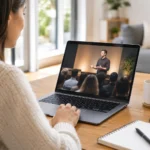
A family searches for a church on Saturday evening. A newcomer checks their phone from a nearby parking lot on Sunday morning. A resident who has just moved to town asks Google a simple question: “churches near me.” Where should churches list services so those people receive a clear, welcoming answer?
The best approach is not choosing one place and hoping it does all the work. Your church’s service times, address, and next-step information should appear in a few trusted places that work together – with your website as the home base. When each listing agrees, visitors feel more confident that they have found the right church, at the right time, in the right place.
Where Should Churches List Services First?
Start with your church website. It is the one place your ministry fully controls, and it should make Sunday information easy to find from every page, especially on a phone. A first-time guest should not have to search through an event calendar, download a bulletin, or guess whether last year’s Christmas schedule still applies.
Place your regular service times prominently in the website header, footer, or a clearly labeled “Plan Your Visit” section. Include the full street address, a map or directions button, parking guidance when useful, children’s ministry information, accessibility details, and a brief note about what guests can expect. If you offer more than one worship service, campus, language, or livestream option, spell out the difference plainly.
Your website is also the best place to explain schedule changes. A holiday weekend, weather closure, special worship night, or combined service can create confusion if the information only appears in a social media post. Update the main service-time page first, then carry the same details to your other channels.
Google Business Profile Is Essential for Local Search
For many guests, Google is their first contact with your church. Your Google Business Profile can display your location, service hours, phone number, photos, reviews, and directions directly in Google Search and Google Maps. It is often what a person sees before they ever visit your website.
Make sure the church name, address, phone number, website address, and regular service times match what appears on your site. Small inconsistencies can cause unnecessary doubt. If Google says services begin at 10:00 a.m. while your website says 10:30 a.m., a guest may simply choose another church rather than risk arriving late.
Use the profile’s updates and event features for special services, but do not rely on them as your only announcement tool. Google can be a powerful doorway into your ministry, yet your website should remain the clearest source for complete and current visitor information. A properly set up and maintained profile also helps nearby seekers discover your church when they search for worship services in their community.
Keep map details practical
An accurate pin matters, especially for churches with large properties, multiple entrances, or a sanctuary set behind another building. Confirm that map directions lead people to the correct entrance or parking area. If a visitor needs to enter through a side door, park in a designated lot, or use a separate entrance for children’s check-in, say so with kindness and clarity.
List Church Services on Social Media, but Do Not Stop There
Facebook and Instagram can keep your congregation informed and help familiar faces share an invitation with friends. A simple weekly post with Sunday times, a welcoming image, and a reminder about children’s ministry can be useful. Facebook event listings may also work well for holiday services, Easter, Christmas Eve, conferences, and community outreach gatherings.
The trade-off is that social posts move quickly. A guest who visits your page after several busy weeks may have to scroll through sermon clips, announcements, and photos to find the information they need. Social platforms also change their layouts and visibility rules regularly. That is why they are best used to point people toward your website and Google listing, not replace them.
Keep the essential details in your social profile bio as well: your city, regular service time, and a simple invitation to plan a visit. Then make certain the website address in your profile leads directly to a page where Sunday details are easy to see.
Other Places That Can Help Visitors Find You
Church directory sites and community directories can add visibility, particularly in communities where people actively use them. Denominational or network directories may also help someone looking for a congregation in a new area. These listings are worthwhile when they are accurate and reasonably easy to maintain.
The priority is not to place your church on every directory available. An abandoned listing with an old address or discontinued service time can do more harm than good. Choose the places your local community is likely to use, then assign someone to review them at least a few times each year.
There are also practical places inside your own communication channels. Include regular service details in your church email footer, on digital welcome slides, and in printed connection cards when space allows. A visitor may take a card home, forward an email to a friend, or see a slide while attending a community event. Consistent information makes it easier for people to take their next step.
Make Service Information Consistent Everywhere
The details do not need to be written exactly the same way on every platform, but the facts must agree. Use one approved version of your church name, address, phone number, and service schedule. This is especially valuable for churches with shared facilities, changing campuses, or multiple worship gatherings.
Before a major season, ask a staff member or trusted volunteer to search for your church as a first-time guest would. Check Google Search, Google Maps, your website, and your main social accounts. Look for old times, broken map links, outdated seasonal graphics, or event pages that have stayed public too long.
A simple review process protects your welcome. When schedules change, decide who updates the website, who updates Google, and who posts on social media. This does not require a large communications team. It requires clear ownership and a short checklist.
What First-Time Guests Need Beyond a Start Time
Listing “Sunday at 10:00” is a good start, but it may not answer the questions keeping a visitor from coming. New guests often want to know where to park, what to wear, how early to arrive, whether children are welcome, and how long the service usually lasts. They may also be looking for reassurance that they will not be singled out or pressured.
A well-written visitor page can answer those questions in a calm, warm voice. Explain what someone can expect when they arrive and offer a simple route to contact the church with questions. Include current photos of the exterior, entrance, sanctuary, and children’s check-in area when possible. These details help people recognize the building and feel less uncertain before they walk in.
For livestreaming churches, make the distinction clear. If the service is both in person and online, list both options together. If a recording becomes available later, say that too. Avoid language that makes guests guess whether “online service” means a live gathering, a replay, or a separate online ministry.
Treat Every Listing as Part of Your Welcome
Your service listing is not merely an administrative detail. It is often the first practical act of hospitality a church offers a new neighbor. Clear information says, “We have prepared for you. You can find us. You are welcome here.”
Churches do not need complicated marketing systems to make that invitation visible. They need a phone-friendly website, an accurate Google Business Profile, current social information, and a habit of checking that each channel tells the same story. With thoughtful care, your digital front door can help a searching person move from a simple online question to a meaningful Sunday morning visit.